-
Type:
Task
-
Resolution: Fixed
-
Affects Version/s: None
-
Component/s: Okapi integration
-
High
-
None
-
OKAPI: Add CLI command to import Across Segmentation Settings regarding Abbrevation ("terms") to an SRX as used in translate5
-
None
-
Emptyshow more show less
Problem
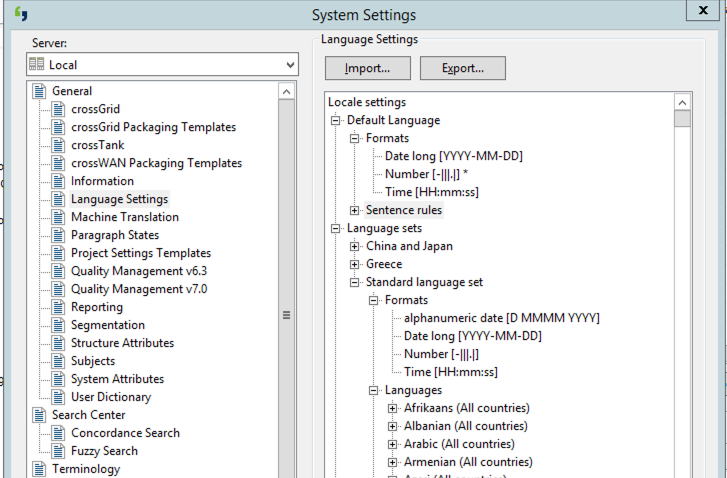
Some customer do have a lot of abbreviations defined in their Across. And they want this abbreviations also in Translate5 to avoid unwanted segmentation.
These configurations are made in Across under "Tools -> System-Settings" under "General -> Language Settings"
Solution
We develop a T5 CLI command called:
okapi:across:patchabbrevations
This command will extract Abbreviations from a language.xml exported from Across and use it for "no-break rules" in SRX. You can find such an language.xml attached here:
LanguageSettings.xml
Inside this file are definitions for multiple different languages. These languages are organised in 2 level:
1. level: langset sample: <langset name="Standard language set">..</langset>
2. level: language, sample: <language lcid="7">..</language>
So you see that we can get the language-name by searching the lcid in LEK_languages table. Hopefully the resulting name fits to the ones used in SRX to separate the different language.
But we need to match SRX <languagerule languagerulename="German">
with lcid=7 from LEK_languages => "Deutsch"
How The command works:
- Add a Across language-Settings "xml" file to the folder APPLICATION_ROOT/data/across/
- Add a SRX-file file to that folder as well (e.g. by downloading it from the file-format-settings management)
- call the CLI-command okapi:across:patchabbrevations which will transfer the abbrevations ("terms") from the across-settings to the SRX file (with basic checking for duplicates!)
Frontend-Testing
See the developer-comment