-
Type:
Bug
-
Resolution: Unresolved
-
None
-
Affects Version/s: None
-
Component/s: Task Management
-
High
-
Emptyshow more show less
problem
It is not obviously to the user if there are warnings or even errors to a task which is not in state error.
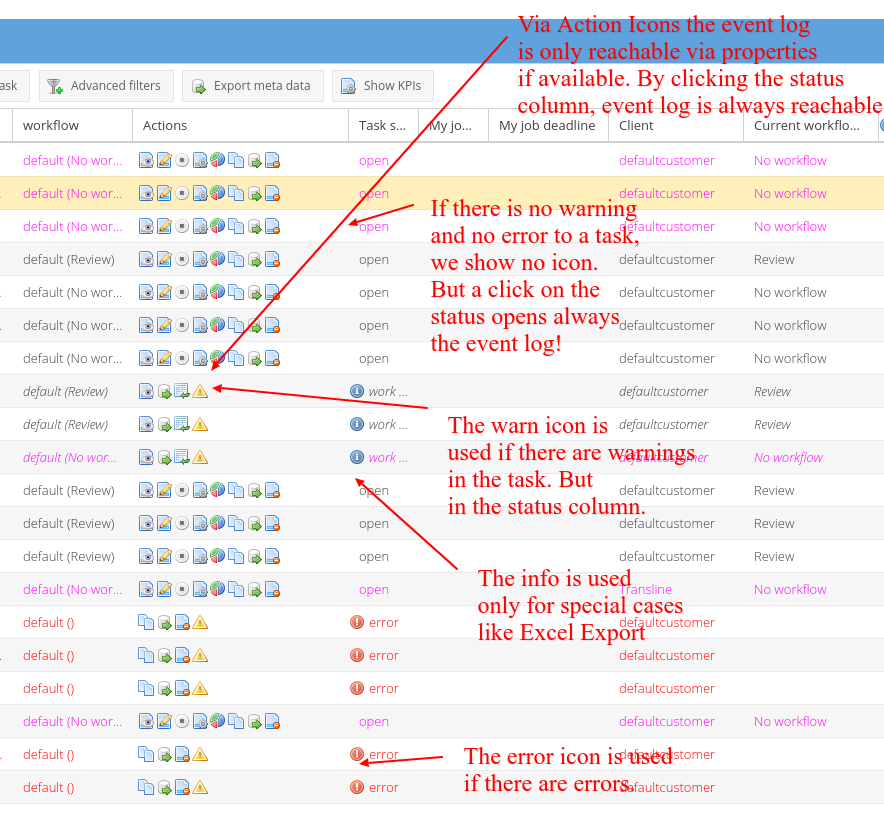
Therefore the icons should be changed as described in the screenshot.
- warn info error icons are only used in the status column
- the status column is always clickable and opens the event log
- warn means there are warnings
- info is shown only in special cases (like excel export)
- error is shown if there is an error in the task log
- The current warn icon in the action column is removed
- Technical precondition: We need the count of event types per task in the taskGrid
In addition the icons should only be shown, if there are unread log-messages for the corresponding icon type.
Should be implemented together with TRANSLATE-2447
- relates to
-
TRANSLATE-4078 Show error and warning icon in new column in tasks and projects
- Done
-
- Selected for dev
-
- Done
-
- Open