-
Type:
Improvement
-
Resolution: Fixed
-
Affects Version/s: None
-
Component/s: usability editor
-
High
-
None
-
Added a spellcheck window for working with the spellcheck errors for all segments. Added capability to apply spellcheck replacement for closed segment.
-
None
-
Emptyshow more show less
If this is implemented, the Draft status must be implemented along with it. https://jira.translate5.net/browse/TRANSLATE-3710
Jump from error to error
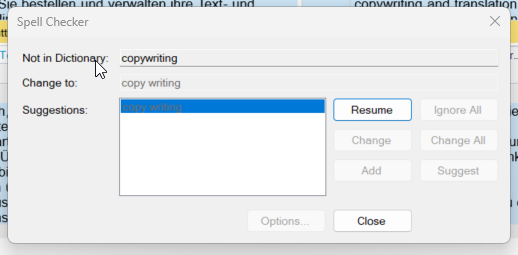
We got the proposal to have something like the languagetool checker pop-up in Trados for translate5.
See screen

If I understand it right, this would be a component, that you can use to jump from segment to segment and either correct errors (also get suggestions for corrections) or mark them as false positives.
Functionalities to be implemented:
- Ignore error (do not change segment status)
- Ignore all same errors for all segments (do not change segment status)
- Replace error with proposal (list all proposals; do change segment status)
- Replace error with proposal for all segments (uses replace all functionality under the hood; do change segment status)
- If replace one error triggers repetition, it should work the same way as currently with search and replace
- Repetition editor should pop up (if configured to pop up) in front of languagetool-check window
- when repetition editor closes, languagetool-check pop-up should still be there
- the same button, that was active in languagetool-check before the repetition opened, should be active again in languagetool-check window, so that user just has to press enter, if he/she wants to do the same for next segment
- if repetition editor is used with"change all" in the repetition editor and you then continue going down in languagetool-check errors one by one, you will not find errors any more, that have been reselved by the replace all of the repetition editor
- Same as with search and replace: You are able to select, if segment is saved as draft or as final status by check-box. Default is draft, but should be state-ful, so remembers, what user selected last.
- We have a tag-field "languagetool category" with "spelling" selected by default. The window jumps only through errors of types, that are selected here.
- F7 will open the short-cut. SHIFT+F7 will restart languagetool check for opened segment
Get languagetool-check proposals for closed segments
Also get languagetool-check proposals, when clicking on an error in a segment, that is not opened.
The segment is visually not opened for editing, but the word is simply replaced and the segment is saved under the hood to the server side (if more easy to implement: visually the user will see it opening, replacing the word, saving and closing - all automatically).
On the right-click a pop-up opens:
- It contains a scrollable list with default 5 entries (visually obvious, that it is scrollable)
- First 2 entries of the list
- Ignore
- Ignore all
- then a seperator line
- then the list of proposals
- selecting a proposal replaces the word
- on the right side of each proposal: Icon for "replace all" with tool-tip that says "Replace all"
Same as with search and replace: You are able to select, if segment is saved as draft or as final status by check-box. Default is draft, but should be state-ful, so remembers, what user selected last.
If there is another segment currently open, it will be saved as draft.
If there is term-markup inside or identical to the span of a language tool mark-up, then when clicking on the span of the term-markup will NOT trigger the pop-up
In opened segment: Combine pop-up for false positive setting with pop-up for languagetool-check proposal
The same combined pop-up on right click as outlined in the previous paragraph should also be used in an opened segment, but with different action icon. But hide the check-box "save as draft".
- is blocked by
-
- Done
- relates to
-
TRANSLATE-5194 search and replace dialogue and repetitions
- Done
-
- Done
-
- Backlog